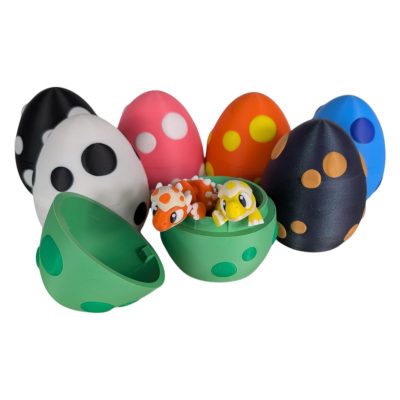
To get something 3D printed without owning a printer, you have three paths: borrow a friend’s or library machine, hire a local maker, or upload your file to an online printing service. You send an STL, OBJ or 3MF file (or even just a photo or idea), choose a material, approve a preview, and it ships to your door.
If you have never touched a 3D printer, this guide walks you through every step in plain language — no software skills, no CAD, no jargon. Whether you want a custom gift, a replacement part, a keepsake of your pet, or a collectible figure, here is exactly how the process works in 2026.
What are the 3 ways to get something 3D printed?
Most beginners assume they need to buy a $500 machine first. You don’t. There are three realistic routes, and for a one-off gift or keepsake, the third is almost always the smartest.
| Path | Cost & effort | Quality | Best for |
|---|---|---|---|
| Own a printer | $300–$1,500 + a learning curve of weeks | Depends on your skill | Hobbyists who want to print often |
| Local maker / library | Free–low, but you do the file prep | Varies by person | Simple one-offs if you already have a file |
| Online service (e.g. 3DCentral) | Per-item price, zero equipment, minutes to order | Professional, farm-grade | Gifts, keepsakes, custom pieces, no experience needed |
Buying a printer makes sense if you’ll print weekly for years. A local maker works if you already have a print-ready file and don’t mind coordinating. For everyone else — especially gift-givers — an online service handles the machine, the materials and the troubleshooting so you only pick what you want.
What file do I need — and what if I only have a photo or an idea?
3D printers read a 3D model file. The three formats you’ll see are STL, OBJ and 3MF. STL is the universal standard and works almost everywhere; OBJ adds color and texture; 3MF is the modern format that bundles geometry, color, scale and print settings into one file (format comparison).
But here is the part most beginners don’t know: you don’t need a file at all. If you only have a photo of your dog, a rough sketch, or just a sentence describing an idea, an AI-assisted service can turn it into a printable model. At 3DCentral we run a dual AI engine (Tripo + Rodin) that generates a 3D model from your text or image, then a human artist refines and prepares it for printing — so the result is AI-assisted but human-finished, built from your concept rather than spat out raw.
How does 3D print quoting work?
Pricing isn’t random. A 3D print quote is driven mainly by four things, and once you understand them the price makes sense:
- Size & material volume — bigger, denser objects use more filament and cost more.
- Print time — taller or more detailed prints occupy a machine longer.
- Infill & strength — a hollow display piece is cheaper than a solid, durable one.
- Quantity — printing 10, 25 or 100 units unlocks volume discounts.
One quiet but real cost for Canadians ordering from US or overseas services: customs, duties and currency conversion. Because 3DCentral prints in Laval, Quebec and prices in Canadian dollars, there are no surprise customs fees and no exchange-rate guesswork — the number you approve is the number you pay.
Which material and color should I choose?
For most beginners, two materials cover nearly everything:
- PLA — the easy, affordable default. Great for figurines, decorative pieces, gifts and display items. Available in 10+ colours.
- PETG — a little tougher and more heat- and moisture-tolerant. Better for functional decorative items or anything that lives outdoors.
If you’re unsure, PLA in your favourite colour is the safe pick for a collectible or keepsake. A good service will recommend the right material for your specific object during the quote.
How long does 3D printing take?
Honest answer from our own farm: most small-to-medium custom pieces ship within a few business days, with rush options for faster turnaround. Domestic shipping inside Canada then takes the usual carrier time — far quicker than waiting on a cross-border parcel stuck in customs.
How do I order from a 3D printing service, step by step?
Here is the exact beginner flow, start to finish:
- Create an account and start your order. Head to the upload page and sign in.
- Provide your model — or your idea. Upload an STL, OBJ or 3MF file, or upload a photo / type a description and let the AI-assisted engine build a draft model.
- Pick material, colour, infill and quantity. PLA or PETG, your colour, and how many you want.
- Get an instant quote. The price updates from size, material and options — in Canadian dollars, all-in.
- Approve the preview before anything prints. You see a render of the exact model and confirm it’s right. Nothing goes on a machine until you say yes.
- Check out securely. Standard Stripe checkout, no equipment, no software.
- It prints and ships. Your piece is produced on the farm and shipped domestically with tracking.
Why order custom 3D printing from a Quebec service?
3DCentral is a Made-in-Quebec print farm with 200+ machines in Laval. For Canadians that means CAD pricing, no customs or duties, fast domestic shipping, and real support in both English and authentic Quebec French. Our dual AI engine plus human-artist finishing means you can go from a vague idea to a tangible object without any technical skill — and you approve a preview before we print a thing.
Our catalog also mixes our own original 3DCentral designs with curated community-artist models, so you can buy a ready-made collectible or commission something entirely your own. (Note: our Commercial License covers 3DCentral original designs only — for rights to a community artist’s model, contact that artist directly.)
Ready to turn your file, photo or idea into a real object? Start your on-demand 3D printing order or explore fully custom 3D printing options — no printer, no experience and no customs required.
Frequently asked questions
Can I get something 3D printed if I don't own a printer?
Yes. You don’t need any equipment. Upload your file (or a photo or idea) to an online service like 3DCentral, pick a material and colour, approve a preview, and your piece is printed and shipped to you. The service handles the machine, materials and troubleshooting.
What file format do I need for 3D printing?
The three common formats are STL, OBJ and 3MF. STL is the universal standard and works almost everywhere; OBJ stores colour and texture; 3MF bundles geometry, colour, scale and print settings in one modern file. If you have no file at all, you can start from a photo or a written description instead.
Can you 3D print from just a photo or an idea?
Yes. 3DCentral uses a dual AI engine (Tripo + Rodin) to generate a 3D model from your photo or text, then a human artist refines and prepares it for printing. The result is AI-assisted but human-finished, built from your concept — no CAD skills required.
How much does it cost to get something 3D printed?
Price is driven mainly by size and material volume, print time, infill/strength and quantity. You get an instant quote before ordering. Because 3DCentral prints in Quebec and prices in Canadian dollars, Canadians avoid customs, duties and exchange-rate surprises.
How long does a custom 3D print take?
Most small-to-medium custom pieces ship within a few business days, with rush options available, followed by standard domestic shipping inside Canada. Printing locally avoids the long waits and customs delays of cross-border orders.
Do I have to pay customs to order a 3D print in Canada?
Not with 3DCentral. Because production happens at our Laval, Quebec farm and ships domestically, there are no customs fees or duties for Canadian customers, and pricing is all in Canadian dollars.
Ready to start with
-
-
-
-
VALUE PACK